
AI Automation Services That Give You Your Time Back
AI automation connects the tools you already use and lets them handle repetitive work for you. I build reliable workflows with Make.com, n8n and AI models that publish content, route leads, send follow-ups, update spreadsheets and create reports automatically, so you can spend your time on work that actually needs you.
Make.com ✦ n8n ✦ OpenAI ✦ Google Sheets ✦ CRMs ✦ WordPress ✦ APIs
The Hidden Cost
Manual Work Is Quietly Eating Your Week
Copying leads into a spreadsheet, sending the same follow-up email, posting the same update to five platforms, pulling numbers for a monthly report. Each task only takes a few minutes, but together they add up to hours every week, and mistakes slip through.
I map how work moves through your business, find the steps a machine can do reliably and build automations around them. AI is used where it genuinely helps, like drafting, summarising or sorting, and every workflow has checks so nothing goes out wrong.
You get documented workflows you own, running on your accounts, not a black box.
Sound Familiar?
Leads Sit in Your Inbox for Hours Before Anyone Replies.
You Re-Type the Same Data Into Multiple Tools.
Content Publishing and Social Posting Take Too Long.
Monthly Reports Eat a Full Day.
You Know Automation Could Help but Don’t Know Where to Start.
What’s Included
Automations I Build
Common workflows, tailored to how your business really works.
AI Blog & Content Automation
Draft, format and publish SEO-ready posts to WordPress with human review steps built in.
Lead Capture & Follow-Up
Form and ad leads sent to your CRM or sheet instantly, with tailored replies and alerts.
Email & CRM Workflows
Trigger follow-ups, updates and reminders automatically based on what customers do.
Social Media Scheduling
Auto-post to Facebook, Instagram, Pinterest and more from one content source.
SEO & Business Reporting
Pull Search Console, Analytics and sales data into automatic weekly or monthly reports.
Custom App Integrations
Connect Google Sheets, CRMs, e-commerce stores and APIs with Make.com or n8n.
Choosing the Tool
Make.com or n8n: Which One Fits?
I build with both. The right one depends on your volume, budget and how much control you want.
| Factor | Make.com | n8n |
|---|---|---|
| Ease of use | Very visual and beginner-friendly | Visual too, but better suited to more complex logic |
| Hosting | Fully managed cloud service | Cloud plan or self-hosted on your own server |
| How you pay | Based on the number of operations a workflow uses | Based on workflow runs, or server costs if self-hosted |
| Best for | Quick wins and moderate volumes | High volumes, custom code, data privacy and complex branching |
Automations Worth Building First
- Lead capture: new form or WhatsApp enquiries go straight to your CRM or sheet with an instant reply, so no lead waits.
- Content publishing: drafts, images and social posts move from idea to WordPress and social channels with fewer manual steps.
- SEO reporting: Search Console and Analytics data lands in a simple weekly or monthly report automatically.
- Follow-ups: reminder emails and status updates go out on time without anyone remembering to send them.
Real Workflows
Automations From Real Projects
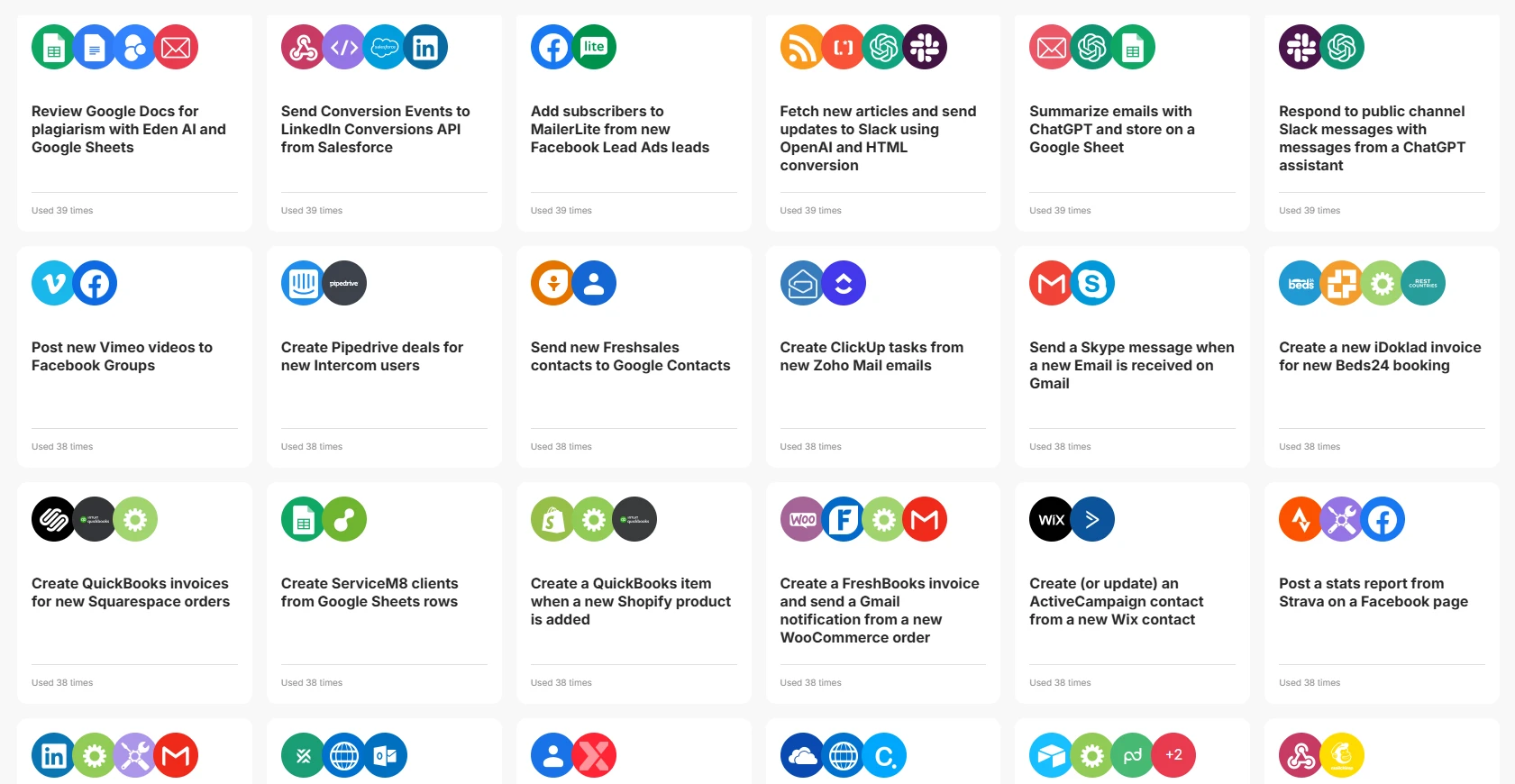
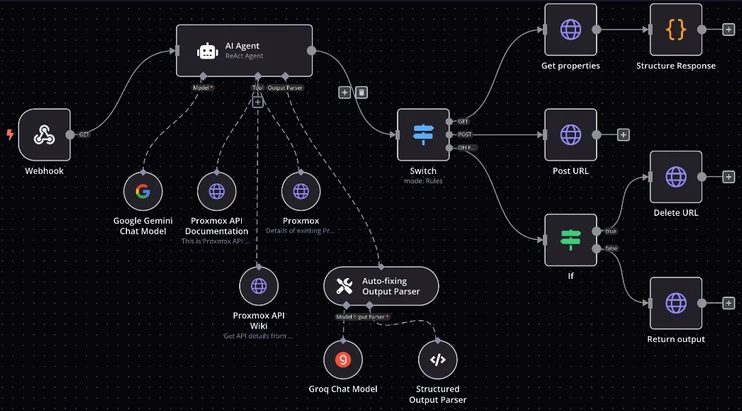
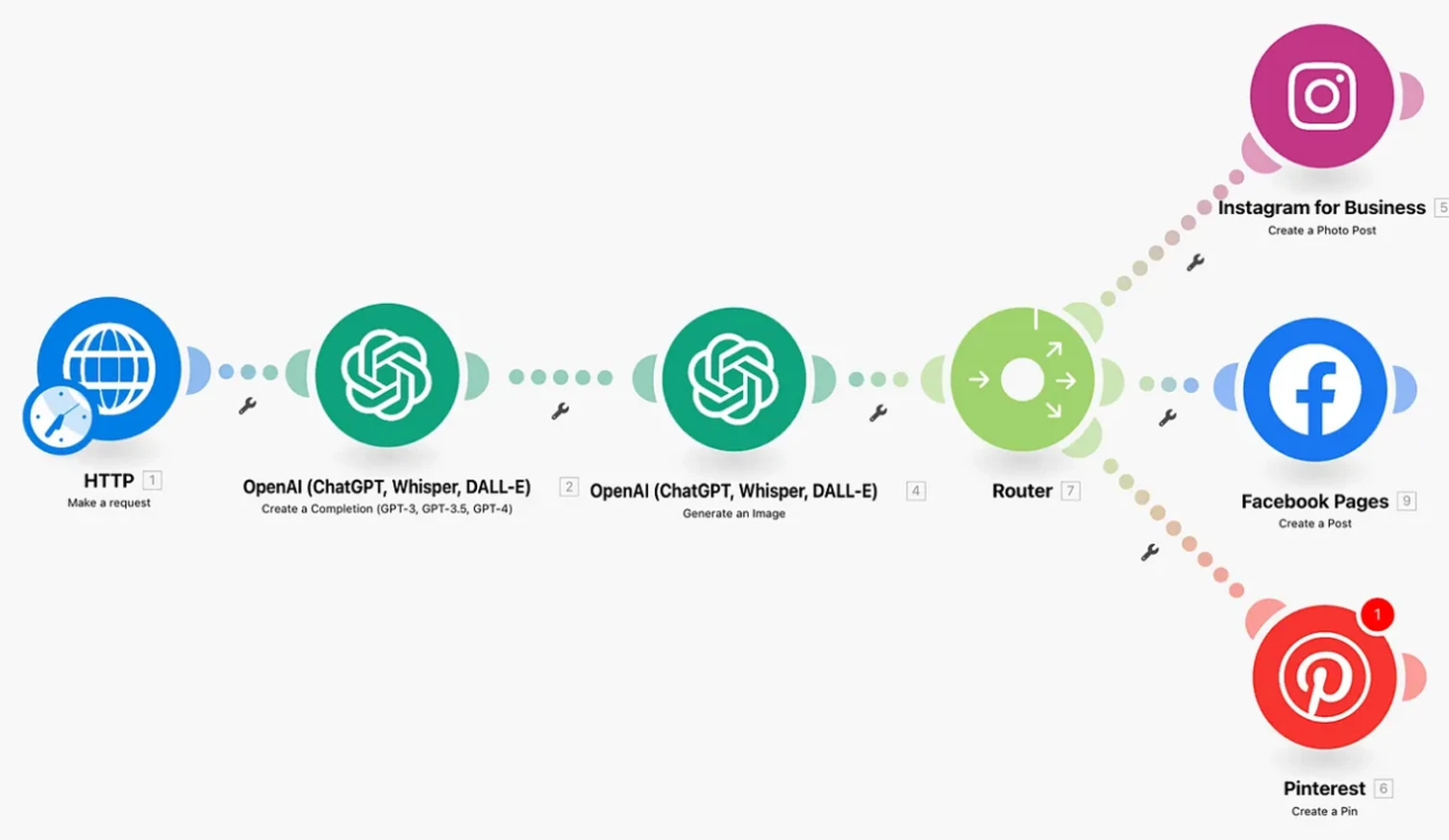
Three examples of the work: a library of ready-made Make.com scenarios, an n8n AI agent that reads and acts on API data, and a Make.com flow that writes and posts social content. More examples are in my portfolio.
How It Works
How an Automation Project Works
Small, reliable steps, tested before they go live.
01
Map the Process
We walk through the task step by step and decide what should be automated.
02
Build the Workflow
I build it in Make.com or n8n on your accounts, with AI where it adds value.
03
Test With Real Data
Every path is tested, including errors, before anything runs on its own.
04
Handover & Support
You get documentation and a walkthrough, plus help if something changes.
Fit Check
Is This the Right Fit for You?
A Good Fit If…
You Repeat the Same Digital Tasks Every Day or Week.
Your Tools Have Integrations or APIs (Most Modern Tools Do).
You Want Reliable Time Savings, Not a Flashy Demo.
You’re Happy to Keep a Human Check on Important Outputs.
Probably Not a Fit If…
You Want AI to Publish Unchecked Content at Scale.
The Process Changes Every Time and Has No Clear Steps.
Your Tools Have No Way to Connect With Others.
You’re Looking for a Fully Custom Software Product.
Related Services
FAQs
AI Automation Services: Common Questions
What business owners ask before automating.
What Are AI Automation Services?
AI automation services design and build workflows that connect your apps and use AI to complete repetitive tasks automatically, such as handling leads, sending emails, publishing content and creating reports.
Should I Use Make.com or n8n?
Make.com is quicker to set up and great for most small businesses. n8n is more flexible and can be self-hosted, which helps with complex workflows or data privacy. I compare them in n8n vs Make.com and recommend one for your case.
Do I Need to Pay for Automation Tools?
Usually yes, though many tools have free tiers that cover small workflows. Subscriptions are set up in your name so you own the automations.
Is AI-generated Content Safe for SEO?
It can be, if a human reviews it and it genuinely helps readers. My content workflows always include review steps, because unchecked AI content at scale is risky.
What Happens If an Automation Breaks?
I build in error alerts so you know when something fails, and I document every workflow so it can be fixed quickly.
Can You Automate My SEO Reporting?
Yes. I can pull data from Search Console, Analytics and other tools into a sheet or dashboard that updates automatically.
Is My Data Safe?
Workflows run on your own accounts with the minimum access they need. For sensitive data, a self-hosted n8n setup keeps everything on your server.

Got a Task You’re Tired of Doing by Hand?
Describe it in a few lines. I’ll reply personally with how I’d automate it.